Checkify

Your data back in your hands

On your device. Not on our servers. Shared only with your consent.

Verify once. Share trust everywhere. Your data stays on your phone.
You decide when it’s shared — and what is shared — every time.

The problem

Digital trust is broken. Businesses need to verify identity and eligibility, but doing so usually means collecting and storing sensitive personal data — creating risk, cost, and regulatory exposure.

Our solution

Checkify enables consent-based identity verification and selective data sharing, allowing businesses to verify trust without becoming long-term data custodians.

How it works

1. Verify once

Users verify once on their own device using biometrics, liveness checks, and optional documents. Personal data stays on the device and is never shared by default.

2. Trust becomes signals

Instead of sharing raw personal data, Checkify converts verification into signed, time-limited trust signals that can be safely reused.

3. Verify instantly

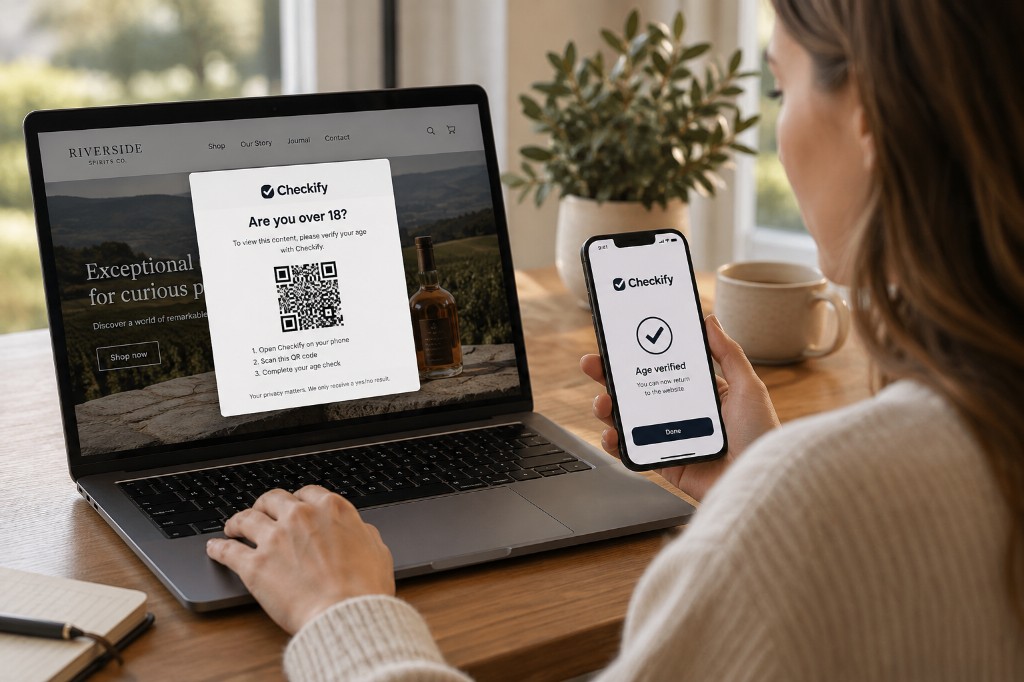
Businesses verify trust instantly via API or QR — they can request specific proofs or data points, but the user reviews every request and must consent before anything is shared.

See it end-to-end

Users stay in control. Businesses get instant, audit-ready verification — without becoming a data vault.

For users

Setup once, reuse everywhere

Step 1

Protect your device

Secure your Checkify identity with a PIN and Face ID / Touch ID. Your identity is device-bound and protected by your biometrics.

Outcome: Device secured
Protect device

Step 2

Prove you’re human

Complete liveness and face confirmation. Checkify turns verification into reusable trust signals — without sharing raw biometric data by default.

Outcome: Human verified
Verify I'm human

Step 3

Add optional government ID

Verify a passport / ID card / driving licence on-device to increase your trust level. You confirm extracted data before it’s stored locally.

Outcome: Identity strengthened (on-device)

Tip: Use redacted demo data on public pages.

Add ID selected Passport extracted data

Step 4

Scan a verification request

Businesses generate a QR request for specific proofs (e.g., “Age over 18”). You scan it to see exactly what they’re asking for.

Outcome: Request received
Scan code

Step 5

Review & approve (consent)

You approve the request. Checkify shares only what’s needed — often just a yes/no proof — and blocks personal data unless you explicitly consent.

Outcome: Signed trust response shared
Review request

Result

Audit-ready receipt

Both sides get a clear confirmation of what was verified, when, and for whom — without exposing unnecessary personal data.

Outcome: Verification recorded
Verification successful receipt

For businesses

Create requests, not data liabilities

To create or claim a business, you must first be a Verified Checkify user. This ensures every business action is tied to a real person.

Step 1

Find your company

Search verified registry data (e.g., UK - Companies House) to locate the correct legal entity.

Outcome: Correct business selected
Add business search

Step 2

Claim & confirm

Claim the business by confirming you’re authorised to act on its behalf. Checkify links your government-ID extracted identity details to the Companies House business record, creating an audit-ready connection between the request issuer (a verified person) and the legal entity.

Outcome: Business ownership asserted
Claim business

Step 3

Create a verification request

Choose which proofs you need (e.g., “Age over 18”) and set expiry. Request personal data only if strictly required — and only with explicit user consent.

Outcome: QR / API request generated
Generate QR options

Step 4

Display a time-limited QR

Display the QR wherever verification happens — on-screen in a web/app flow or physically at the point of service (reception, counter, door). Requests expire automatically to reduce replay risk.

Outcome: Live verification request created
Verification QR with expiry

Step 5

Track scans and verification events

Businesses can view a real-time log of QR scans and verification outcomes — including timestamps, decision results, and reference IDs — giving an audit-ready record without storing unnecessary personal data.

Outcome: Audit-ready scan log
Verification event log

Security by design

Checkify is built so users stay in control and businesses can verify trust without becoming a data vault.

Device-first storage

Personal data is stored on the user’s device and protected by OS-level secure storage and biometrics. Sharing is always explicit and consent-based.

Signed, time-limited requests

QR and API requests are cryptographically signed and expire automatically. This reduces replay risk and ensures responses are tamper-evident.

JWT + encryption in transit

Sessions and API calls use JWT-based authentication and are encrypted in transit (TLS). Tokens are scoped and time-limited to reduce exposure.

Selective disclosure

Businesses can request specific proofs or data points, but users review every request and must consent before anything is shared.

Audit-ready logs

Verification events include timestamps, decision outcomes, and reference IDs for traceability — without requiring businesses to store unnecessary personal data.

Privacy-first defaults

By default, Checkify shares proofs (e.g., “Over 18”) rather than raw personal data. Data requests can be restricted to only what’s needed.

Note: Exact security controls vary by deployment and integration requirements. We can provide a detailed security overview for partners and regulated environments.

Trust levels

Basic

Device-bound presence and continuity.

Verified

Liveness and biometric confirmation.

Identity Verified

Government ID verified on-device.

Identity Verified +

Government ID verified on-device, Multi-signal, audit-ready trust.

Explore the Sandbox

Generate QR verification requests, simulate trust responses, and see exactly how Checkify works — end to end.

Go to Sandbox