
أثبت ما هو مطلوب
يمكن للموقع الإلكتروني أن يسأل عما إذا كنت فوق سن 18 عامًا دون الحاجة تلقائيًا إلى تاريخ ميلادك الكامل.
Checkify من أجلك
استخدم Checkify لإثبات أشياء مثل عمرك، أو أنك إنسان، أو هويتك الموثقة - دون تقديم نفس المعلومات الشخصية لكل موقع ويب وشركة تستخدمها.

لماذا Checkify؟
يمكن للموقع الإلكتروني أن يسأل عما إذا كنت فوق سن 18 عامًا دون الحاجة تلقائيًا إلى تاريخ ميلادك الكامل.
اطلع على ما تطلبه الشركة قبل الموافقة على الطلب.
عند توفر الدعم، يمكن أن تساعدك أدلة التحقق الحالية في إكمال طلبات Checkify المستقبلية دون تكرار العملية الأصلية بلا داع.
حيثما يتم دعم Checkify، يمكنك استخدام تطبيق واحد لطلبات إثبات الهوية اليومية.
بدلاً من تسليم وثائق الهوية بشكل متكرر إلى المتاجر الفردية.
هل عمرك فوق 18 عامًا؟ ✓ نعم
بديل أنظف لبوابات مواقع الويب المدعومة بنمط CAPTCHA.
إنسان؟ ✓ تم التحقق
قم بمسح طلب Checkify QR وأظهر الدليل المطلوب للتدفقات المادية المدعومة.
عند الحاجة إلى تحقق أقوى، استخدم هويتك المعتمدة والموثقة.
الفرق في الخصوصية
تم تصميم Checkify حول مشاركة الدليل اللازم للتفاعل بدلاً من تسليم معلومات الهوية الأساسية غير الضرورية تلقائيًا إلى كل شركة.
كيف يعمل برنامج Checkify
أربع خطوات بسيطة - بدون رحلة تقنية لإدارة الهوية.
قم بإعداد تطبيق Checkify الخاص بك باستخدام أمان الجهاز المدعوم.
أكمل عمليات التحقق المدعومة التي ترغب في استخدامها، مثل التحقق البشري أو التحقق من الهوية.
يطلب موقع ويب أو تطبيق أو موقع فعلي دليلاً محدداً من نوع Checkify.
اطلع على المطلوب وقم بالموافقة على التفاعل.
يحصلون على النتيجة المطلوبة. وتبقى أنت متحكماً في الطلب.
ترى الطلب
تم تصميم Checkify بحيث يكون طلب الإثبات مرئيًا لك قبل الموافقة على التفاعل.
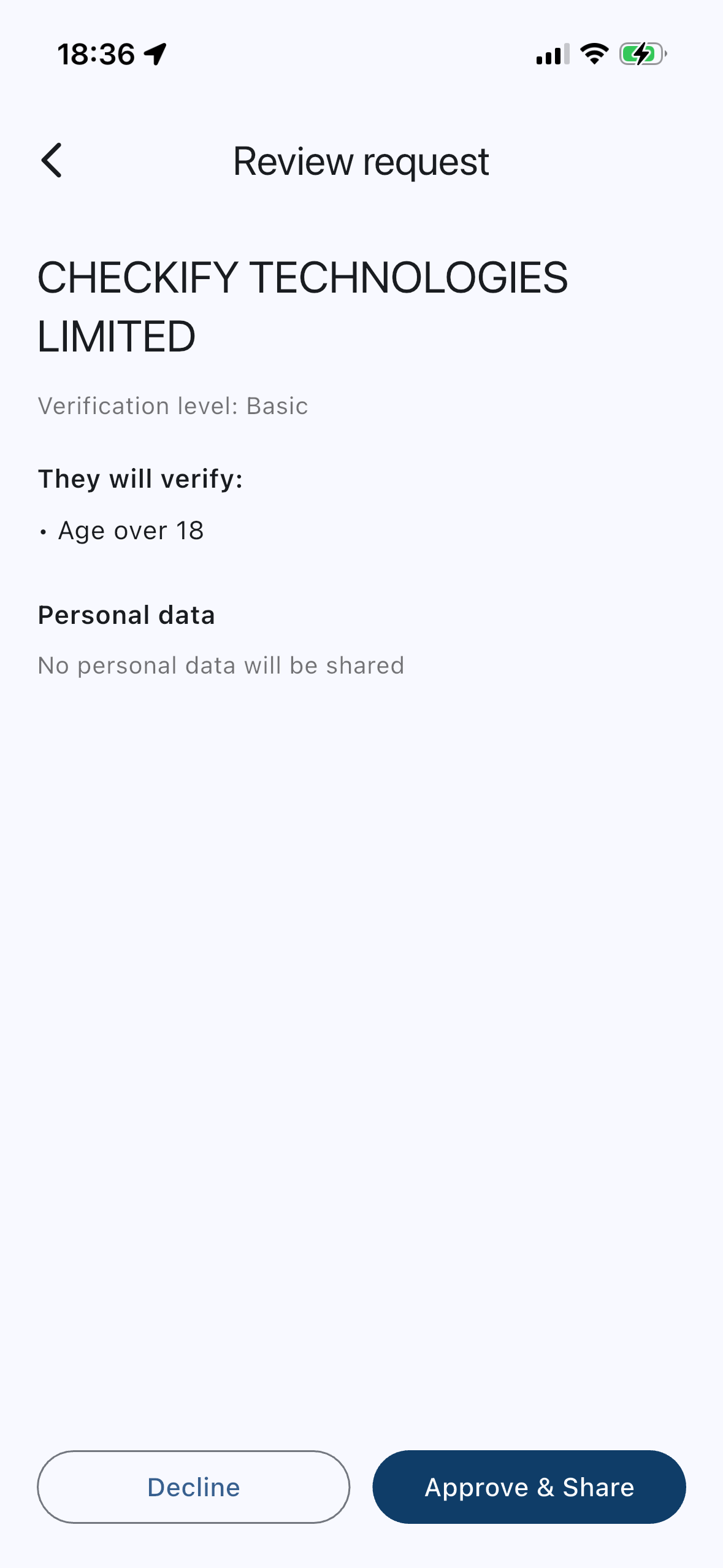
متجر نموذجي
الدليل المطلوبيبلغ من العمر 18 عامًا أو أكثر
ما يحصل عليه العملأكثر من 18 عامًا ✓
دليل أقوى عندما تحتاج إليه
تتطلب بعض الخدمات مستوى ثقة أعلى من مجرد إثبات هوية بشري أو إثبات العمر. يمكن لـ Checkify استخدام التحقق من الهوية المدعوم لتعزيز مستوى ضمانك، بحيث يمكن للطلبات المستقبلية طلب الإثبات الذي تحتاجه فعلاً.
أثبت أنك شخص حقيقي عند تعبئة النماذج وإجراء عمليات التحقق من الموقع الإلكتروني المدعوم.
ضمان أقوى عندما تحتاج الخدمة إلى مزيد من الثقة.
استخدم مسارات الأدلة المدعومة بقوة أكبر عندما يتطلب الأمر ذلك بسبب المخاطر.
لا يلزم إضافة وثائق إثبات الهوية في كل استخدام لـ Checkify. يعتمد ذلك على المطلوب.
تقليل التكرار
عند توفر الدعم، يمكن لـ Checkify استخدام أدلة التحقق الموجودة للمساعدة في تلبية طلب آخر دون تكرار عملية الجمع الأصلية بلا داع.
هذا ليس نظام تحقق لمرة واحدة للاستخدام في كل مكان. كل شركة تتلقى فقط الإثبات المطلوب والمعتمد لتلك المعاملة.
هل عمرك يزيد عن 18 عامًا؟
✓ فوق 18 عامًا
تعتمد المعلومات الدقيقة على طلب Checkify والخدمة المستخدمة. يمكنك مراجعة الطلب قبل الموافقة عليه.
لا يُصمّم برنامج Checkify على أساس تسليم هويتك للمواقع الإلكترونية دون علمك. يتم عرض الطلب عليك لتتمكن من رؤية ما يُطلب منك.
ليس فقط المواقع الإلكترونية
حيثما كان ذلك مدعومًا، يمكنك مسح طلب Checkify QR ضوئيًا في موقع فعلي والموافقة على الدليل المطلوب.
يمكن أن تشمل الأمثلة المدعومة المتاجر والأماكن ونقاط التجميع وحفلات الاستقبال والفعاليات - حيث يتم إعداد Checkify.
مصمم حول تحكمك
استخدم رمز PIN المدعوم، وأمان الجهاز، والبيانات البيومترية لحماية الوصول إلى Checkify.
اطلع على الأدلة المطلوبة قبل الموافقة.
تم تصميم Checkify لتقليل مشاركة بيانات الهوية غير الضرورية.
هل وصل بك موقع إلكتروني إلى هنا؟
قم بتنزيل التطبيق إذا لم يكن لديك بالفعل.
انظر ما هو الدليل المطلوب.
أنجز فقط ما يتطلبه هذا الطلب.
الموافقة على التفاعل أو رفضه.
ثم ارجع إلى الموقع الإلكتروني أو تابع من الموقع المحدد.
قم بتنزيل Checkify، وقم بإعداد التحقق الذي تريد استخدامه، وستكون جاهزًا عندما يطلب موقع ويب أو شركة مدعومة إثباتًا.
نعم. برنامج Checkify مجاني للتنزيل والاستخدام للأفراد. أما الشركات فتدفع مقابل التحقق من خلال خطط وأرصدة Checkify.
ليس تلقائيًا. تم تصميم Checkify لإرجاع الإثبات المطلوب للتفاعل - على سبيل المثال، فوق 18 عامًا ✓ - بدلاً من تسليم وثائق هويتك الكاملة افتراضيًا.
يعتمد الأمر على المطلوب. فالعديد من الطلبات لا تتطلب سوى إثبات هوية أو إثبات عمر. أما التحقق المعزز من الهوية فهو اختياري ويعتمد على حالة الاستخدام.
نعم. يمكنك مراجعة الطلب ورفضه.
عند توفر الدعم، يمكن أن تساعدك أدلة التحقق الموجودة في تلبية طلب آخر من طلبات Checkify دون تكرار العملية الأصلية بلا داعٍ. ولا تحصل كل شركة إلا على ما يطلبه ذلك الطلب.
على مواقع الويب والتطبيقات والمواقع الفعلية المدعومة من Checkify. يعتمد التوفر على مكان إعداد الشركة لـ Checkify.
تم تصميم تطبيق Checkify ليتناسب مع جهازك وخيارات حسابك. يعتمد نقل التحقق إلى هاتف جديد على خيارات الاسترداد والإعداد المتاحة في Checkify في ذلك الوقت - لذا اتبع الإرشادات داخل التطبيق بدلاً من افتراض النقل التلقائي.
نعم. يتضمن تطبيق GLO 6 خيارات لمسح بيانات التحقق وإزالة الجهاز، مما يؤدي إلى فصل الجهاز وحذف بيانات التطبيق المحلية. راجع سياسة الخصوصية لمعرفة كيفية تعامل GLO 6 مع البيانات الشخصية والطلبات.
جاهز عندما تحتاج لإثبات ذلك
قم بتنزيل Checkify وكن مستعدًا عندما يطلب منك موقع ويب أو تطبيق أو موقع مدعوم إثبات عمرك أو إنسانيتك أو هويتك.