
Dimostra ciò che è necessario
Un sito web può chiedere se hai più di 18 anni senza richiedere automaticamente la tua data di nascita completa.
Checkify per te
Utilizza Checkify per dimostrare cose come la tua età, che sei una persona reale o la tua identità verificata, senza dover fornire le stesse informazioni personali a ogni sito web e azienda che frequenti.

Perché Checkify?
Un sito web può chiedere se hai più di 18 anni senza richiedere automaticamente la tua data di nascita completa.
Prima di approvare la richiesta, verifica cosa ti sta chiedendo l'azienda.
Laddove supportato, i dati di verifica esistenti possono aiutarti a completare le future richieste Checkify senza ripetere inutilmente il processo originale.
Dove Checkify è supportato, puoi utilizzare un'unica app per le richieste di prova quotidiane.
Invece di consegnare ripetutamente i documenti d'identità ai singoli negozi.
Hai più di 18 anni? ✓ Sì
Un'alternativa più pulita ai gate dei siti web in stile CAPTCHA supportati.
Umano? ✓ Verificato
Scansiona una richiesta Checkify QR e mostra la prova richiesta per i flussi fisici supportati.
Quando è effettivamente necessaria una verifica più rigorosa, utilizza la tua identità verificata e supportata.
La differenza in materia di privacy
Checkify è progettato per condividere le prove necessarie all'interazione, anziché fornire automaticamente a ogni azienda informazioni di identità sottostanti non necessarie.
Come funziona Checkify
Quattro semplici passaggi, senza dover affrontare complesse procedure di gestione dell'identità.
Configura la tua app Checkify utilizzando le misure di sicurezza del dispositivo supportate.
Completa i controlli supportati che desideri utilizzare, come la verifica umana o dell'identità.
Un sito web, un'app o un luogo fisico richiede una specifica prova Checkify.
Visualizza la richiesta e approva l'interazione.
Ottengono il risultato desiderato. Tu mantieni il controllo della richiesta.
Vedi la richiesta
Checkify è progettato in modo che la richiesta di bozza sia visibile prima che l'interazione venga approvata.
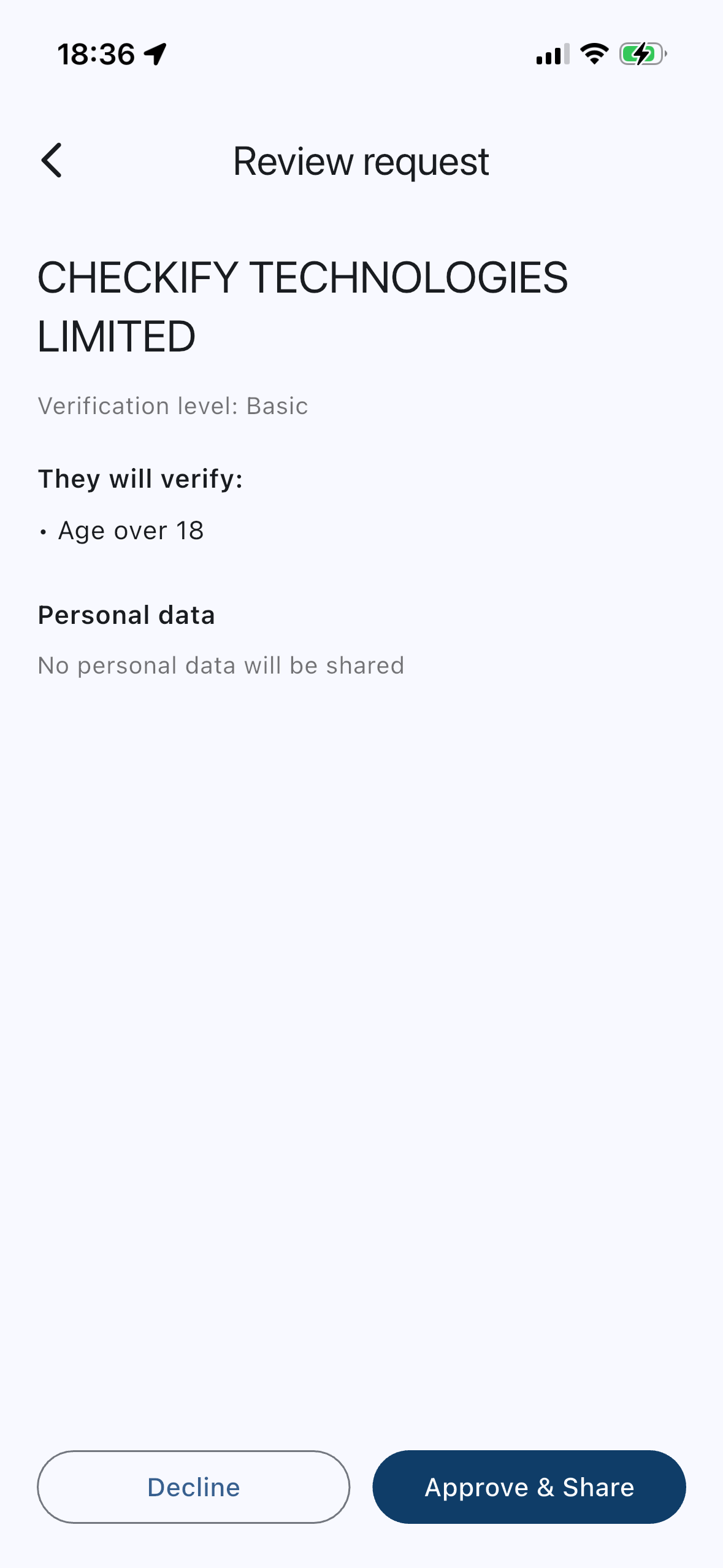
Esempio di negozio
Prova richiestaEtà pari o superiore a 18 anni
Ciò che l'azienda riceveMaggiore di 18 anni ✓
Una prova più solida quando ne hai bisogno.
Alcuni servizi richiedono una maggiore sicurezza rispetto a una semplice verifica dell'identità o dell'età. Checkify può utilizzare la verifica dell'identità supportata per rafforzare il livello di sicurezza, in modo che le richieste future possano richiedere le prove effettivamente necessarie.
Dimostra di essere una persona reale per i moduli e le verifiche dei siti web supportati.
Maggiore sicurezza quando un servizio richiede più fiducia.
Utilizzare percorsi basati su prove più solide quando il rischio lo richiede.
Non è necessario allegare documenti di identità per ogni utilizzo di Checkify. Dipende da cosa viene richiesto.
Meno ripetizioni
Laddove supportato, Checkify può utilizzare le prove di verifica esistenti per contribuire a soddisfare un'altra richiesta senza ripetere inutilmente il processo di raccolta originale.
Non si tratta di un sistema "verifica una volta, usa ovunque". Ogni azienda riceve solo la prova richiesta e approvata per quella specifica interazione.
Hai più di 18 anni?
✓ Maggiore di 18 anni
Le informazioni esatte dipendono dalla richiesta Checkify e dal servizio utilizzato. È possibile rivedere la richiesta prima di approvarla.
Checkify non è progettato per cedere silenziosamente la tua identità ai siti web. La richiesta ti viene presentata in modo che tu possa vedere cosa ti viene chiesto.
Non solo siti web
Laddove supportato, è possibile scansionare una richiesta Checkify QR presso una sede fisica e approvare la prova necessaria.
Tra gli esempi supportati figurano negozi, sedi, punti di raccolta, reception ed eventi, dove è installato Checkify.
Costruito attorno al tuo controllo
Utilizza PIN, sicurezza del dispositivo e dati biometrici supportati per proteggere l'accesso a Checkify.
Prima dell'approvazione, verifica quali prove vengono richieste.
Checkify è progettato per ridurre al minimo la condivisione non necessaria dei dati di identità.
Un sito web ti ha indirizzato qui?
Scarica l'app se non l'hai ancora.
Verifica quale prova viene richiesta.
Completa solo ciò che la richiesta richiede.
Approva o rifiuta l'interazione.
Quindi torna al sito web oppure continua sul posto.
Scarica Checkify, configura il metodo di verifica che desideri utilizzare e sarai pronto quando un sito web o un'azienda supportata ti richiederà una prova.
Sì. Checkify è scaricabile e utilizzabile gratuitamente dagli utenti privati. Le aziende pagano per la verifica tramite i piani e i crediti di Checkify.
Non automaticamente. Checkify è progettato per restituire la prova richiesta per l'interazione, ad esempio Maggiore di 18 anni ✓, anziché richiedere automaticamente la consegna di tutti i documenti di identità.
Dipende da cosa viene richiesto. Molte richieste richiedono solo una prova di identità o dell'età. Una verifica dell'identità più rigorosa è facoltativa e dipende dal caso d'uso.
Sì. Puoi esaminare una richiesta e rifiutarla.
Laddove supportato, i dati di verifica esistenti possono aiutarti a soddisfare un'altra richiesta Checkify senza ripetere inutilmente il processo originale. Ogni azienda riceve solo ciò che richiede.
Sui siti web, le app e le sedi fisiche Checkify supportati. La disponibilità dipende da dove un'azienda ha configurato Checkify.
Checkify è progettato in base al dispositivo e alle opzioni dell'account presenti nell'app. Il trasferimento della verifica su un nuovo telefono dipende dalle opzioni di ripristino e configurazione disponibili in Checkify al momento: segui le istruzioni nell'app anziché dare per scontato il trasferimento automatico.
Sì. L'app Checkify include opzioni per cancellare i dati di verifica e rimuovere un dispositivo, operazione che disconnette il dispositivo e rimuove i dati locali dell'app. Consulta l'Informativa sulla privacy per informazioni su come Checkify gestisce i dati personali e le richieste.
Pronto quando dovrai dimostrarlo
Scarica Checkify e preparati quando un sito web, un'app o un luogo supportato ti chiederà di dimostrare la tua età, il tuo status di persona o la tua identità.